
People follow a gym for months before they come to a first class. What gets them through the door is a clear next step, like a free trial. Postfjord keeps that step in front of them every week, and answers the DM when they finally ask.
- 5saved replies ready on day one: trial, schedule, prices, beginners, how to find you
- 6 PMon Sunday, Bo drafts next week's posts from your plan, if you switch it on
- 4sizes from one design: square, portrait, story and landscape
What you get on day one
Pick Gym or fitness studio when you create your workspace. Postfjord fills in a starting point for a gym. You read it, change what you like and save.
- A starting brand voice for a gym: encouraging, direct and welcoming, with rules like no before and after photos of bodies.
- Three content pillars: classes on Monday, a tip on Wednesday, community on Friday.
- Five saved replies: free trial, schedule, prices, beginners and how to find you.
- A first automation, filled in: someone comments TRIAL and gets your booking link in a DM. Paste your link and switch it on.
- Design layouts and an email starter with gym words already in them, like Beginner class Thursday 6 PM or Bring a friend for free.
A week at a hot yoga studio
An example week for a small studio with Instagram, a Facebook page and TikTok. Seven posts, one quiet day, all planned on Sunday evening.
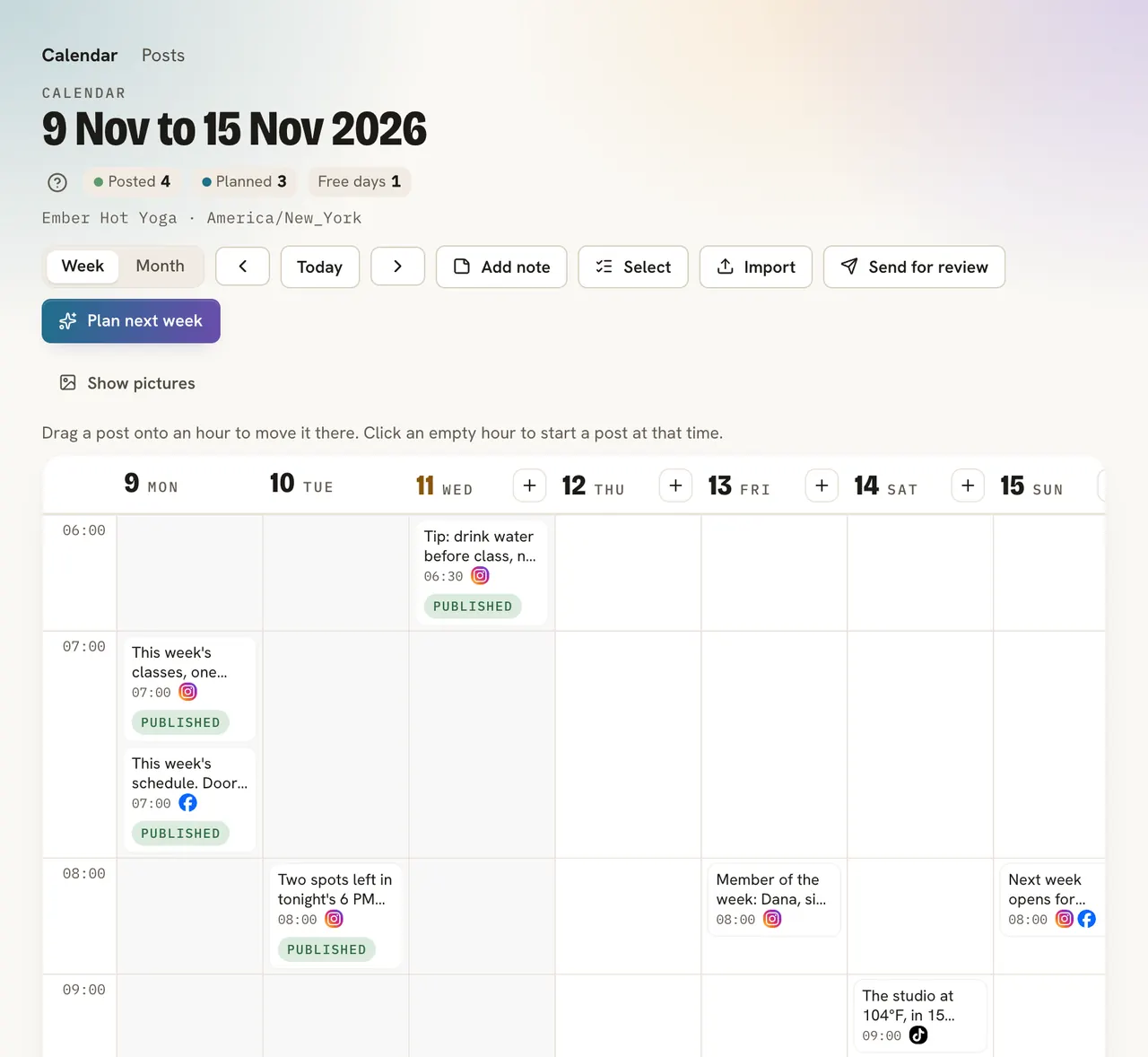
How the week gets planned
Check your pillars
Classes on Monday, a tip on Wednesday, community on Friday. They are filled in for a gym. Change them once, and they hold every week.
Press Plan next week
Bo writes a draft for each pillar in your brand voice. Or switch on Sunday drafts, and Bo does it every Sunday at 6 PM.
Read, change, approve
Change a word, swap a photo, or press Dictate and say a new idea between two classes. Thirty seconds is enough.
Postfjord publishes
Only the posts you approve go into the calendar. Each one goes out at its time. If one does not, you get an email, and the post says why with a button to try again.
From a comment to a first class
Most trial questions come in a DM, often late in the evening. The TRIAL automation answers in seconds. The inbox keeps the conversation, so a coach can pick it up the next morning.

Saved replies cover the questions that come back every week: prices, the schedule, parking. Type a slash in the inbox and pick one.
Make a landing page for the free trial with the booking button at the top, and put its QR code on the front desk.
Fill a beginner program with a Flow
A Flow ties a post, a DM, a landing page and emails into one path. Tell Bo what you want in one sentence, and Bo plans up to 14 posts and makes every part as a draft for you to check.

Nothing goes out before you press Go live. Flow is on the paid plans.
See which posts bring people in
Connect Calendly or Acuity, or send bookings from Mindbody, Momence, Glofox and others to your own address. Each automation then shows the classes it booked, and everyone who books gets the tag Booked.
That tag can start an email: a thank you after the first class, with a link to leave a Google review.
Read on
FAQ
Does Postfjord handle bookings or memberships?
No. Keep your booking and membership system. Postfjord points people to it and counts the bookings its links bring in. Mindbody, Momence, Glofox and others can send bookings to your own address, directly or through Zapier.
Can Postfjord send a thank you DM after the class?
Not as a DM. Instagram and Messenger only let a business write within 24 hours of the person's last message, so the thank you goes by email when they have said yes to your emails.
We have two locations. One workspace or two?
Two, one per Instagram account. Studio includes five workspaces for $99 a month, $75 billed yearly, with five members each.
Who writes the posts?
You, or Bo in your brand voice, or both. Bo writes drafts. Nothing goes out until a person approves it.